Students are already using AI to study. The real question is whether the AI they’re using is designed to support learning or just give them the answer. Many commonly used tools aren’t designed for education. They prioritize speed over understanding, and institutions have responded by limiting or blocking access entirely, even as students continue to use AI on their own. Without a purpose-built learning experience, trust often becomes the barrier to enabling AI for students at all.
The Study and Learn Agent changes that. Now generally available within Microsoft 365 Copilot for all education customers at no additional cost, it gives institutions a learning-focused approach to enabling AI for students age 13 and older. For K-12 accounts, Copilot Chat is off by default for students and access must be enabled by an IT administrator. Once permission is granted, students access Study & Learn directly within the Copilot app, with no separate login or additional application required. A video walkthrough of the configuration helps guide you through these steps.

Introducing the Study and Learn Agent
AI doesn’t have to circumvent learning. It can deepen it. The Study and Learn Agent is a first-party AI agent in Microsoft 365 Copilot, built around a single principle: the learner does the thinking. Through guided conversations and interactive activities, it helps students grasp concepts, work through problems, and sharpen their writing—adapting to what each student needs at that moment.
Study & Learn reframes AI from an “answer bot” and can function like an interactive learning and coaching experience, helping students build understanding and develop independent thinking.
Built on learning science, not just AI
What sets Study and Learn apart from other AI tools is that it is built on established learning science about what makes learning stick. Every interaction is intentionally designed to help reinforce learning, not bypass it.
The experience is grounded in four research-based principles:
- Adaptive scaffolding: meeting students where they are by activating what they already know, then providing enough support to stretch them into what’s next
- Productive struggle: asking before telling, so students retrieve, attempt, and reason their way toward answers
- Active learning: practice that sticks with retrieval-based activities including flashcards, fill-in-the-blanks, quizzes and matching
- Application and transfer: giving students the agency to go deeper, apply their learning, or reinforce it with an activity
Used together, these principles move students beyond passive review and into active engagement with the material. Each interaction is designed to build on the last, supporting the kind of deep understanding that holds up beyond a single test or assignment.
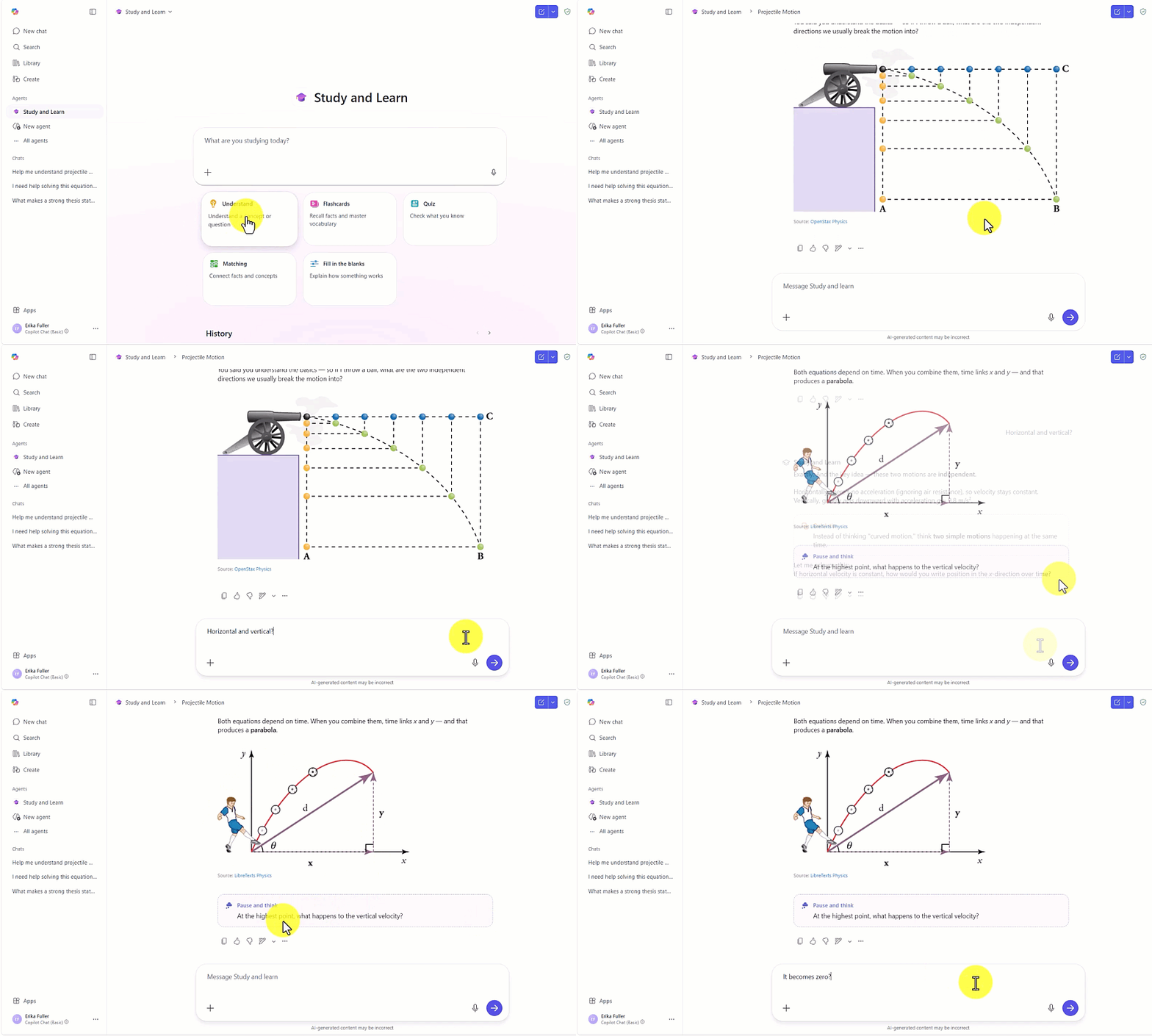
From chat to active learning
Study and Learn transforms Copilot Chat from a standard chat experience into an interactive learning environment. For example, a student studying for a biology test can quiz themselves on the cell cycle and get a flashcard set generated on the spot. A student stuck on a calculus problem can be walked through it step-by-step without being given the answer. Or a student writing a history essay can talk through their argument and get questions back that sharpens their thinking.
Using this approach, students engage with Study and Learn through:
- Guided questioning including step-by-step problems, writing, understanding broad concepts, and breaking down large topics into manageable component parts
- Interactive learning with activities that both build and check for understanding
- Immediate feedback that catches misconceptions and mistakes
The result is a more engaging study experience that supports understanding, builds independent thinking, and fosters retention. Whether a student is preparing for an exam, working through a complex concept, or revising a piece of writing, Study and Learn adapts and keeps the work of learning where it belongs: with the student.

Enable AI with confidence
For school leaders, business decision makers, and IT administrators, Study and Learn is designed to help address the key barriers to adopting AI for students. Institutions have consistently signaled the need for learning-focused AI experiences, guardrails, and control over student AI use, and confidence that AI supports, rather than undermines, teaching and learning.
Study and Learn is designed to meet those needs. It is built into the Microsoft 365 Education environment that schools already manage, giving IT administrators familiar controls and enterprise-grade data and privacy protection rooted in Microsoft’s responsible AI principles. Students get a structured, accountable AI experience, and schools get a credible, learning-first option they can deploy with confidence.
Copilot, built for education
Study & Learn is part of a broader Microsoft vision of Copilot built for education. That means AI is designed to support every participant in the learning environment, not a single general tool adapted for multiple audiences. This includes two AI agents:
- Teach that supports educators in designing and delivering instruction.
- Study and Learn that supports students in building knowledge and skills.
Together, Teach and Study and Learn represent a complete AI ecosystem built around the realities of teaching and learning, inside the tools that educators and students already use.
Get started today
Study and Learn is available within the Microsoft 365 Copilot app on the web and desktop for education customers with a Microsoft 365 Education license at no additional cost. Students access it directly by logging into Copilot using their Microsoft Entra ID school credentials. The Study and Learn Agent is located in the left navigation bar of Copilot. Study and Learn is optimized and available today in English (United States). In the coming weeks, Study and Learn will expand to cover additional languages. For IT administrators, the next steps include:
- Configuration steps video walkthrough
- Identify and set the Education Tenant Identifier
- Set student age group
Study and Learn gives institutions a credible, learning-first path to enabling Copilot for students at scale. Follow the instructions above to enable Copilot for your students ages 13 and older today.