

This blog is part of a series that responds to common questions we receive from customers about Microsoft 365 Security and Enterprise Mobility + Security. In this series you’ll find context, answers, and guidance for deployment and driving adoption within your organization. In part one of this series, we outlined Tips for getting started on your security deployment.
Microsoft has a service designed specifically to help you deploy and drive adoption of Microsoft Security across your organization: FastTrack for Microsoft 365.
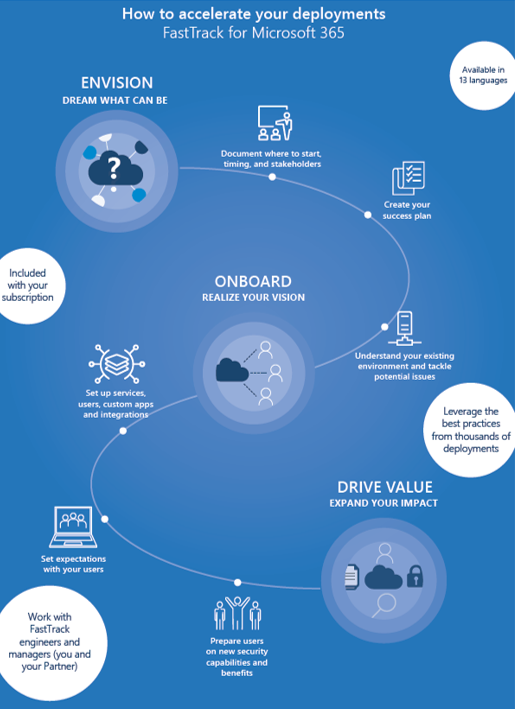
FastTrack is included with your subscription and gives you access to Microsoft engineers and managers in 13 different languages to support your deployments. With more than 40,000 new customers deployed, FastTrack has experience and best practices that can really help make your deployment smoother as our customer success stories can attest. FastTrack follows a proven and highly recommended model—comprised of stages for envisioning, deploying and driving adoption—that can be applied to any point of your deployment journey.
FastTrack also has a track record of success with customers:
- 38 percent reduction in time to onboard
- 3.5x increase in active usage
- 67 percent increase satisfaction
We saw what Microsoft was putting into Intune and saw that it could protect our data while helping us remain productive, and that it would grow with our future needs. And the other thing was the magnitude of positive experience and support from the FastTrack Center.
– Willem Bagchus: Messaging and Collaboration Specialist, United Bank
We’re thrilled with what we are hearing from customers and learning through FastTrack. Here’s a sampling of some of the best practices FastTrack has developed for driving a successful deployment of Microsoft Security:
- Take time at the outset to envision your success: Know your goals and key scenarios you want to enable, familiarize yourself with the products, map key stakeholders, and influencers, tackle quick wins, build a communications plan, and remember the end user.
- Deploy and realize your vision thoughtfully: Test and pilot thoroughly, have a migration strategy, and get experts to help with the tough questions.
- Drive adoption across your organization with great communications: Hold launch events, provide trainings, encourage ongoing engagement and thoroughly communicate the changes (and how users can get started) through assets like an FAQ, posters, brown bags, etc.
Of course, there are far too many tips, nuances, and best practices to list here—you’ll get far more when you reach out to the FastTrack team directly.
To recap, Microsoft 365 Security, including Office 365, Windows 10 and EMS, is a critical part of your organizational security strategy and FastTrack for Microsoft 365 provides the optimum deployment and adoption support. For more information on FastTrack, check out the FastTrack Overview. Get started on your journey today with a request for assistance from the FastTrack security page.
More blog posts from this series: