

This blog post is part of the Microsoft Intelligence Security Association guest blog series. To learn more about MISA, go here.
The growth of mobile and remote work and the emergence of the “post perimeter” world has made keeping track of shadow IT a huge challenge for enterprise IT teams. What makes this problem particularly difficult for infosec teams is a parallel development. Not only are your apps leaving the data-center, but your employees are leaving the building. In the good old days, you might have used firewalls or secure web gateways to give you visibility. On top of that, risky or unsanctioned apps could be blocked with a firewall script or added to a blacklist.
But with employees working from home, the network perimeter has disappeared. In this new world, how can you have any idea what’s going on, let alone impose control?
The growth of SaaS
The rapid adoption of SaaS services has driven cloud computing and digital transformation for many organizations. File storage, CRM, and ERP systems are now commonly delivered on a SaaS basis. Services based on the SaaS model offer fantastic advantages. For a start, they do not require in-house infrastructure. In addition, they have rich out of the box feature sets and deliver across both web and mobile platforms. Finally, their low upfront commitment and automatic version updates make them easy to adopt. Their advantages are endless…
…and of Shadow IT
Research by Microsoft shows that on average enterprises use more than 1,000 SaaS applications and that IT are unaware of more than 60% of these applications (so-called ‘shadow IT’). As a result, corporate data can easily slip beyond the control of the company’s ‘gatekeeper’. Once your CRM is in the cloud, your visibility is limited – it’s more challenging to see when a soon to depart salesperson has downloaded the contact details of your entire customer base. Or, imagine that highly- sensitive network diagrams are leaked online leaving your company vulnerable to spoofing or Man-in-the-Middle attacks.
Discovery and control
It is on foot of these trends that the ability to discover and control cloud app usage across organizations has become critical. New SaaS apps need to be quickly identified and risk assessed. Approved apps can be integrated with existing identity and security processes while risky and unsanctioned apps can be blocked. Robust mechanisms for discovering cloud app usage and blocking unapproved apps are important. Remote and mobile work scenarios present particular challenges because they are beyond the network perimeter. For instance, mobile app usage has doubled since organizations migrated to remote working. As a result, companies have no way of knowing what SaaS services their employees are engaging with. For example, an employee might use unsanctioned cloud storage apps for uploading client data or use unapproved marketing automation tools. This is why cloud app security and visibility is critical.
Why endpoint makes sense
The answer to this is what the industry calls “endpoint cloud application discovery and control”. What does this clunky phrase refer to, you ask? It refers to the use of endpoint security solutions, such as Corrata or Microsoft Defender ATP, to identify cloud app usage and to block risky or unsanctioned apps.
The endpoint security solution collects traffic information to discover what apps are in use, uploading this information to a cloud access security broker (CASB) solution such as Microsoft Cloud App Security. The IT admin uses the CASB portal to specify which apps are to be blocked. The CASB then automatically forwards these instructions to the endpoint security solution which enforces the block on the endpoint.
At Ignite 2019, Microsoft Cloud App Security announced an integration with Microsoft Defender ATP to bring endpoint-based cloud discovery and control to Windows devices. Now Corrata’s integration with Microsoft Cloud App Security means that Microsoft customers can extend the same discovery and control to phones and tablets. This means that you can automatically detect the cloud apps your employees are using on mobile devices and take the appropriate security actions. Namely, Corrata acts as a firewall on your unmanaged mobile and tablet devices.
How does it work?
Corrata and Microsoft have worked together to ensure that the integration of the Corrata solution with Microsoft Cloud App Security is simple and easy to implement.
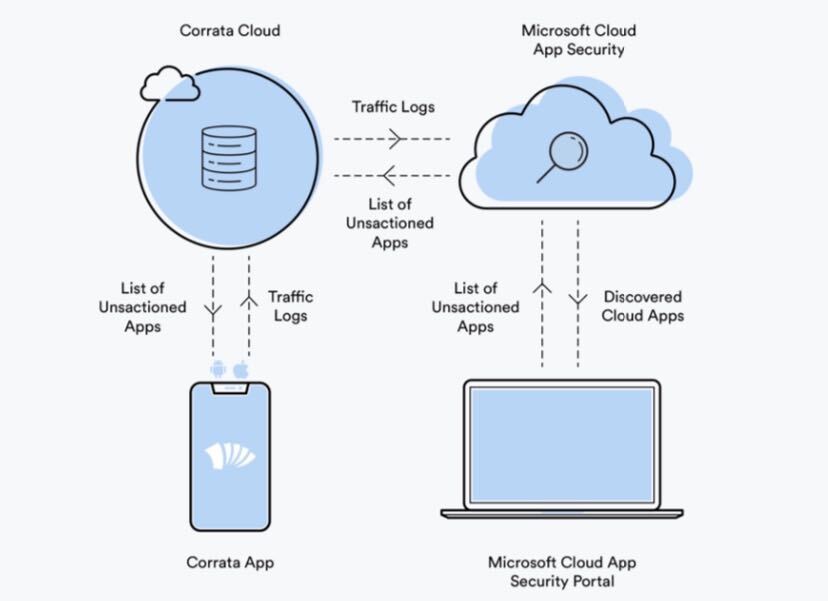
Traffic information from smartphones and tablets running Corrata is uploaded for analysis to Microsoft Cloud App Security on a continuous basis. Cloud app usage information collected by Corrata is visible to admins via the Microsoft Cloud App Security console. This provides an integrated view of an organization’s cloud app usage and one-click enforcement of app usage policies across iOS, Android, and Windows devices.
App designated as risky or unsanctioned within the Cloud App Security portal are automatically blocked by Corrata on the mobile endpoint. This capability is delivered using Corrata’s patented SafePathML technology which uses Machine Learning to accurately assess the probability of a domain being unsafe. With SafePathML, Corrata can block threats even before the wider cyber security community has identified them.
If you’re an existing or prospective Corrata or Microsoft Cloud App Security customer, you can learn more here about how to harness the advantages of endpoint-based discovery and control for cloud apps.
Corrata is a member of the Microsoft Intelligent Security Association.
Find the Corrata Microsoft Cloud App Security Solution on the Azure Marketplace here.
To learn more about the Microsoft Intelligent Security Association (MISA) #MISA, visit our website where you can learn more about the MISA program, product integrations, and find MISA members. Visit the video playlist to learn more about the strength of member integrations with Microsoft products.
To learn more about Microsoft Security solutions, visit our website. Bookmark the Security blog to keep up with our expert coverage on security matters. Also, follow us at @MSFTSecurity for the latest news and updates on cybersecurity.