How can I prepare for PowerPivot?
By Denny Lee, SQL Server Customer Advisory Team 
One of the main concerns for PowerPivot as an IT Professional or Database Administrator is that PowerPivot involves many different systems of SharePoint, Office, and SQL Server 2008 R2. It also has a lot of moving parts and making sure that all of these parts work together can be daunting.
To help prepare for this, the SQL Server and Office beta programs worked to understand the difficulties and issues customers had faced from usability to installation. We had even worked with a number of highly qualified SharePoint Rangers whom had difficulties installing and maintaining PowerPivot!
From these customer feedback and beta tests, we had worked together to create the whitepaper Microsoft SQL Server PowerPivot Planning and Deployment which I highly recommend you read before planning and deploying PowerPivot.
In addition to the fact that this paper contains architecture and design information, hardware requirements, topologies, PowerPivot / SharePoint service associations, storage requirements, and deployment planning:
- Contribution and technical reviews of this whitepaper were done by key members of the Analysis Services and SQL Server Customer Advisory Team deeply involved with the SQL Server 2008 R2 PowerPivot TAP (Technology Adoption Program).
- This whitepaper was written by a professional author to ensure the information is readable and interesting!
- This whitepaper even includes a decision flow diagram to help you decide how to deploy PowerPivot for SharePoint.
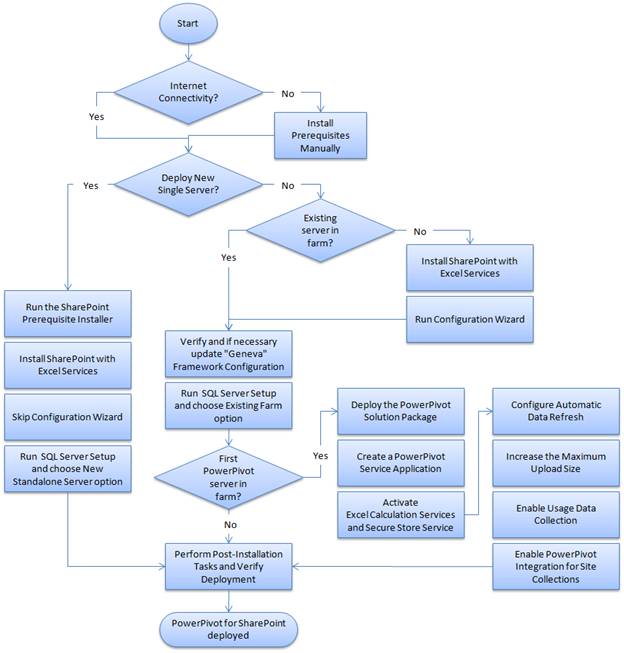
PowerPivot is an amazing new Self-Service BI tool spanning Excel, SharePoint, and SQL Server 2008 R2. The Microsoft SQL Server PowerPivot Planning and Deployment will help prepare you for the new and different concepts for a successful PowerPivot deployment.
Technorati Tags: SQL Server 2008 R2,PowerPivot