Announcing an updated version of PowerPivot for Excel
Today, Microsoft is announcing the launch of Windows Azure Marketplace (formerly codenamed “Dallas”). The Windows Azure Marketplace is an online marketplace to find, share, advertise, buy and sell building block components, premium data sets and finished applications. Windows Azure Marketplace includes a data section called DataMarket, aka Microsoft Codename Dallas.
With this announcement, the SQL Server team has released an updated version of PowerPivot for Excel with functionality to support true 1-click discovery and service directly to DataMarket. Using this new PowerPivot for Excel add-in, customers will be able to directly access trusted premium and public domain data from DataMarket. Download the new version of PowerPivot at http://www.powerpivot.com
|
FAQ
1. I’ve installed the new PowerPivot for Excel add-in… now what do I do?
|
|
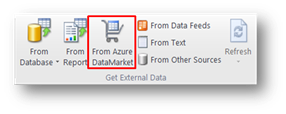
Once you install the new add-in, go to the PowerPivot work area and you’ll notice under the “Get External Data” section a new icon that allows you directly discover and consume data from DataMarket
2. In addition to being able to directly connect to DataMarket, are there any other new functionality in PowerPivot for Excel or PowerPivot for SharePoint? This updated version only adds direct access to Marketplace and no additional functionality is being shipped in PowerPivot for Excel. There’re no changes in PowerPivot for SharePoint either.
3. I just installed the latest version of PowerPivot from Download Center but I don’t see the DataMarket icon.
It takes about 24 hours to replicate the new bits into all the servers WW. Please be patient and again after a few hours |