SSMS 17.8 is now available
This post is co-authored by Pam Lahoud, Senior Program Manager, SQL Server.
We are excited to announce the release of SQL Server Management Studio (SSMS) 17.8!
Download SSMS 17.8 and review the Release Notes to get started.
SSMS 17.8 provides support for almost all feature areas on SQL Server 2008 through the latest SQL Server 2017, which is now generally available.
In addition to enhancements and bug fixes, SSMS 17.8 comes with several new features:
- Database Properties | FileGroups: This improvement exposes the “AUTOGROW_ALL_FILES” configuration option for Filegroups.
- SQL Editor: Improved experience with Intellisense in SQL Azure DB when the user lacks master access.
- Scripting: General performance improvements, especially over high-latency connections.
- Bug Fixes
View the Release Notes for more information.
Database Properties | FileGroups:
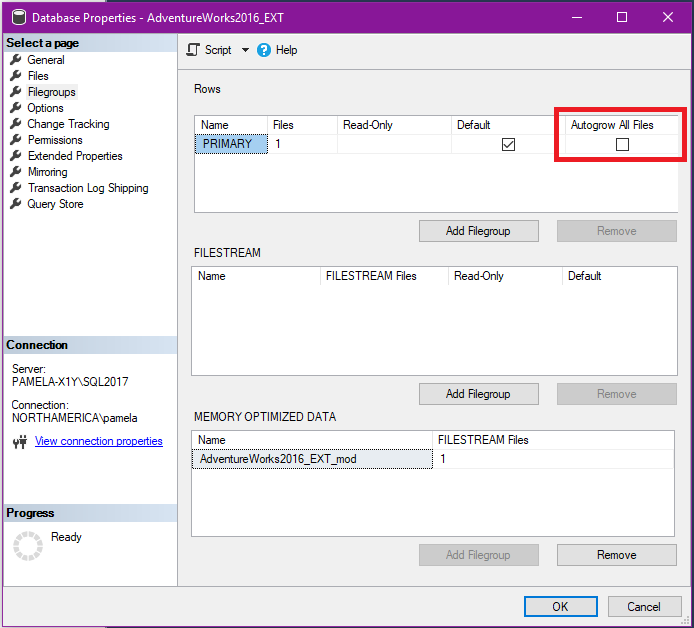
In this release of SQL Server Management Studio, we have introduced UI and scripting support for the AUTOGROW_ALL_FILES database filegroup property. This property was introduced in SQL Server 2016 to replace trace flag 1117, but it was only settable via T-SQL script. Now you can set the property via a checkbox in the Database Properties -> Filegroups page:
You can also use the “Script” button to script out the change:
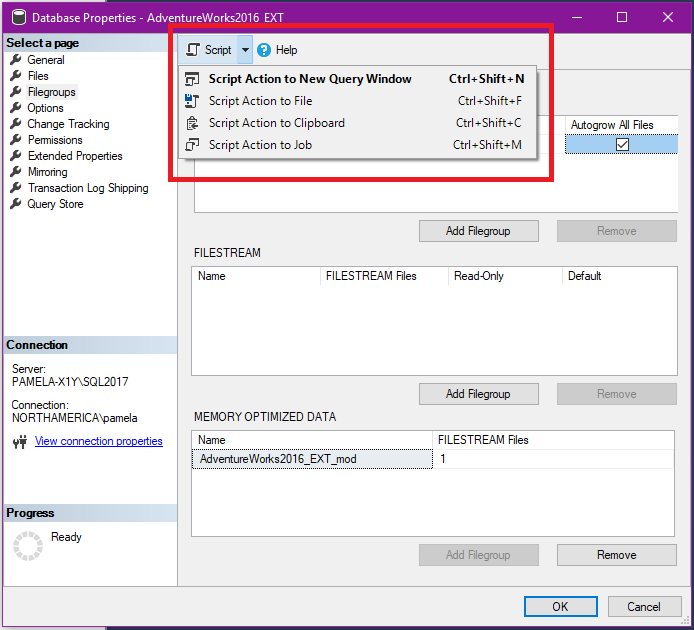
This will generate the following script:
USE [AdventureWorks2016_EXT]

GO

declare @autogrow bit

SELECT @autogrow=convert(bit, is_autogrow_all_files) FROM sys.filegroups WHERE name=N'PRIMARY'

if(@autogrow=0)

ALTER DATABASE [AdventureWorks2016_EXT] MODIFY FILEGROUP [PRIMARY] AUTOGROW_ALL_FILES

GO
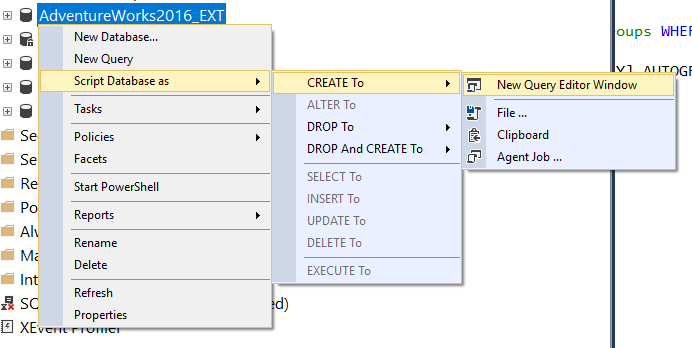
Scripting support has also been added to the “Generate Scripts” task and the “Script Database as” context menu in the Object Explorer:
Bug fixes:
In SSMS 17.8, there were many bug fixes.
To highlight a few of these:
- Maintenance Plans.
Fixed an issue when editing maintenance plans with Sql Authentication where “Notify Operator Task” was failing when using SQL authentication. - Scripting.
Fixed an issue where PostProcess actions in SMO lead to resource exhaustion and SQL login failures. - SMO.
Fixed an issue where Table.Alter() fails if adding a column with a default constraint and the table already has data. More details available here. - Always Encrypted.
Fixed an issue (in DacFx) which was causing a lock timeout error when enabling Always Encrypted on a partitioned table.
To learn more about other bug fixes covered in this release, check the Release Notes.
Call to action
Try it out and let us know what you think! You can message us on our Twitter @sqldatatools or reach out to Ken Van Hyning’s twitter @sqltoolsguy.