Announcing a new update for mssql-cli: Special Commands
We have released our first major update for mssql-cli since our recent Public Preview announcement in December. You can view the public preview announcement here.
mssql-cli is a new and interactive command line query tool for SQL Server. This open source tool works cross-platform and is part of the dbcli community.
Feature highlight: Special commands
In our initial release, mssql-cli brought auto-completion, syntax highlighting, configuration support, and history to your SQL Server command line experience. Bringing more features over from PGCLI, we introduce special commands.
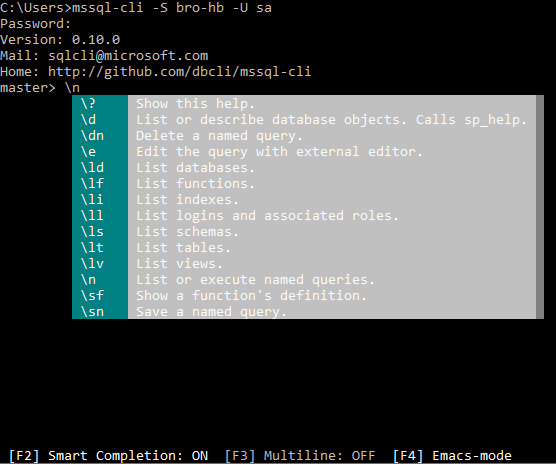
Special commands are meant to make your life easier. They are shortcuts to perform common tasks and queries. All special commands start with a backslash (\), and you can use the built-in IntelliSense to see a list of special commands you can use. You can also learn more by running the following command:
$ mssql-cli>\?
To start off, let’s say you have a common query you run often, but don’t want to type it out each time or scroll through your history. You can “save” your query by running the following special command:
$ mssql-cli>\sn address select * from "Person"."AddressType"
To execute this query, simply run:
$ mssql-cli>\n address
To see this in action, see the gif below:

To learn more about special commands, please check out usage guide, which also includes information about other features that you can use with mssql-cli.
Getting started
In order to install mssql-cli, you must have Python on your machine. Please refer to the installation guide for OS-specific methods to get Python.
mssql-cli is installed via pip. If you know pip, you can install mssql-cli using command.
$ pip install mssql-cli
Once you have mssql-cli installed, connect to your database with the command:
$ mssql-cli -S <server name> -U <user name> -d <database name>
Please try out mssql-cli and submit any feature requests and issues on our Github issues page. You can also keep track of any future updates by following our Twitter @sqldatatools.