


This blog post was authored by Garrett Watumull, Program Manager, Windows Server.
Today we’re releasing another build of the Windows Server 2019 preview for Windows Insiders. As you may remember, Windows Server 2019 was announced a couple months ago and will be generally available later this year. With each release, we bring some new functionality and this time we’re pleased to introduce you to System Insights.
What is System Insights
As an IT admin, one of the responsibilities you have is to ensure systems continue to run smoothly. That is true for a number of activities and components, such as monitoring if a disk is going to run out of space, determining how much memory and processing a Hyper-V host is consuming so you can plan for new VMs, and many other examples.
System Insights is a new feature available today in the Windows Server 2019 preview that brings local predictive analytics capabilities natively to Windows Server. These predictive capabilities, each backed by a machine-learning model, locally analyze Windows Server system data, such as performance counters and events, providing high-accuracy predictions that help you reduce the operational expenses associated with reactively managing your Windows Server instances.
Because each of these capabilities runs locally, all your data is collected, stored, and analyzed directly on your Windows Server instance, allowing you to use predictive analytics capabilities without any cloud connectivity. In Windows Server 2019, System Insights introduces a set of capabilities focused on capacity forecasting, predicting future usage for compute, networking, and storage.
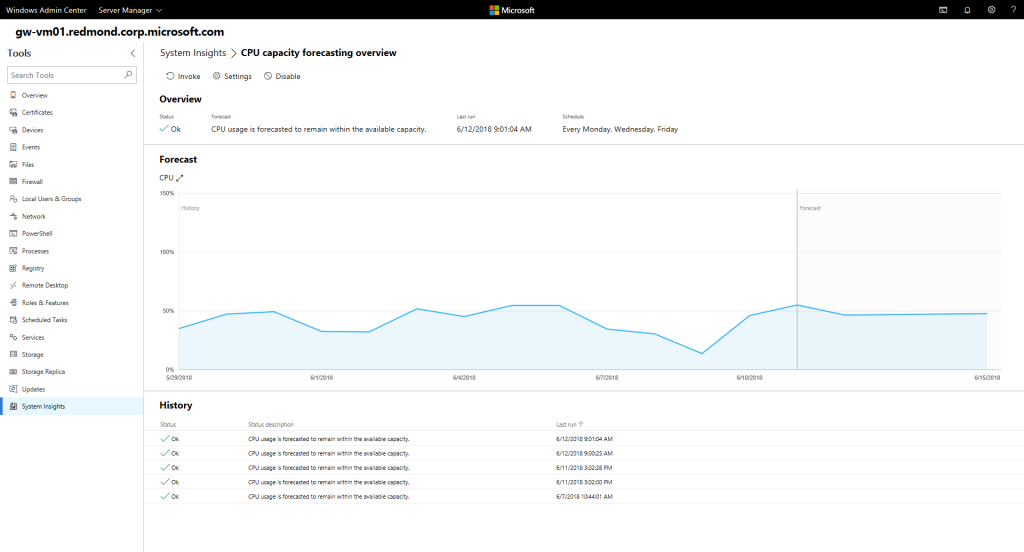
Figure 1: System Insights dashboard on Windows Admin Center
As seen in the image above, you can manage System Insights through Windows Admin Center. System Insights also offers a rich PowerShell interface to enable building robust automation.
Current functionality and upcoming plans
With the current Windows Server 2019 preview build, System Insights users can:
- Browse through predictive capabilities, and either invoke a capability on-demand or configure it to run it on a periodic schedule.
- Visualize prediction outcomes to intuitively understand capacity consumption trends.
- Set custom remediation jobs to automatically run after a capability generates a specific result, helping users automatically mitigate the issues detected by the predictive capabilities.
- View and understand how capacity predictions from an individual Windows Server are trending over a period of time.
- Use PowerShell on remote instances to aggregate prediction outcomes reported by a fleet of related Windows Server instances – e.g. cluster, application tier, rack, and data center – to understand how the fleet overall is trending along compute, storage, or network capacity dimensions.
We’ll continue to improve System Insights. In future builds we’ll add new functionality that introduces optional clustered storage predictions, remediation PowerShell script recommendations, rich Windows Admin Center user experience enhancements, and the ability to dynamically install new predictive capabilities that require custom system data.
Download the preview today
You can get started with System Insights today by downloading the preview of Windows Server 2019 and Windows Admin Center.
Don’t forget to also save the date for the Windows Server Summit, where you’ll be able to see some great new stuff for Windows Server 2019.