

Skip to main content Why Microsoft Security AI-powered cybersecurity Cloud security Data security & governance Identity & network access Privacy & risk management Security for AI Unified SecOps Zero Trust Microsoft Defender Microsoft Entra Microsoft Intune Microsoft Priva Microsoft Purview Microsoft Sentinel Microsoft Security Copilot Microsoft Entra ID (Azure Active Directory) Microsoft Entra Agent ID Microsoft Entra External ID Microsoft Entra ID Governance Microsoft Entra ID Protection Microsoft Entra Internet Access Microsoft Entra Private Access Microsoft Entra Permissions Management Microsoft Entra Verified ID Microsoft Entra Workload ID Microsoft Entra Domain Services Azure Key Vault Microsoft Sentinel Microsoft Defender for Cloud Microsoft Defender XDR Microsoft Defender for Endpoint Microsoft Defender for Office 365 Microsoft Defender for Identity Microsoft Defender for Cloud Apps Microsoft Security Exposure Management Microsoft Defender Vulnerability Management Microsoft Defender Threat Intelligence Microsoft Defender Suite for Business Premium Microsoft Defender for Cloud Microsoft Defender Cloud Security Posture Mgmt Microsoft Defender External Attack Surface Management Azure Firewall Azure Web App Firewall Azure DDoS Protection GitHub Advanced Security Microsoft Defender for Endpoint Microsoft Defender XDR Microsoft Defender for Business Microsoft Intune core capabilities Microsoft Defender for IoT Microsoft Defender Vulnerability Management Microsoft Intune Advanced Analytics Microsoft Intune Endpoint Privilege Management Microsoft Intune Enterprise Application Management Microsoft Intune Remote Help Microsoft Cloud PKI Microsoft Purview Communication Compliance Microsoft Purview Compliance Manager Microsoft Purview Data Lifecycle Management Microsoft Purview eDiscovery Microsoft Purview Audit Microsoft Priva Risk Management Microsoft Priva Subject Rights Requests Microsoft Purview Data Governance Microsoft Purview Suite for Business Premium Microsoft Purview data security capabilities Pricing Services Partners Cybersecurity awareness Customer stories Security 101 Product trials How we protect Microsoft Industry recognition Microsoft Security Insider Microsoft Digital Defense Report Security Response Center Microsoft Security Blog Microsoft Security Events Microsoft Tech Community Documentation Technical Content Library Training & certifications Compliance Program for Microsoft Cloud Microsoft Trust Center Security Engineering Portal Service Trust Portal Microsoft Secure Future Initiative Business Solutions Hub Contact Sales Start free trial Microsoft Security Azure Dynamics 365 Microsoft 365 Microsoft Teams Windows 365 Microsoft AI Azure Space Mixed reality Microsoft HoloLens Microsoft Viva Quantum computing Sustainability Education Automotive Financial services Government Healthcare Manufacturing Retail Find a partner Become a partner Partner Network Microsoft Marketplace Marketplace Rewards Software development companies Blog Microsoft Advertising Developer Center Documentation Events Licensing Microsoft Learn Microsoft Research View Sitemap

Years ago, Java exploits were a primary attack vector for many attackers looking to infect systems, but more recently, Adobe Flash Player took that mantle.

After accounting for almost half of object detections during some quarters in 2014, Java applets on malicious pages decreased to negligible levels by the end of 2015, owing to a number of changes that have been made to both Java and Internet Explorer over the past two years.

In January 2014, Java Runtime Environment was updated to require all applets running in browsers to be digitally signed by default. Later that year, Microsoft published updates for Internet Explorer versions 8 through 11 that began blocking out-of-date ActiveX controls. Windows 10’s default browser, Microsoft Edge, does not support Java or Active X at all, and other browsers like Google’s Chrome and Mozilla’s Firefox are doing the same.

With defenses against Java attacks gaining the upper hand, Flash Player objects have become the most commonly detected threat hosted on malicious web pages by an overwhelming margin. This type of exploit has led the way in each of the past four quarters, from a low of 93.3 percent in the first quarter of 2015, to an all-time high of 99.2 percent last fall.
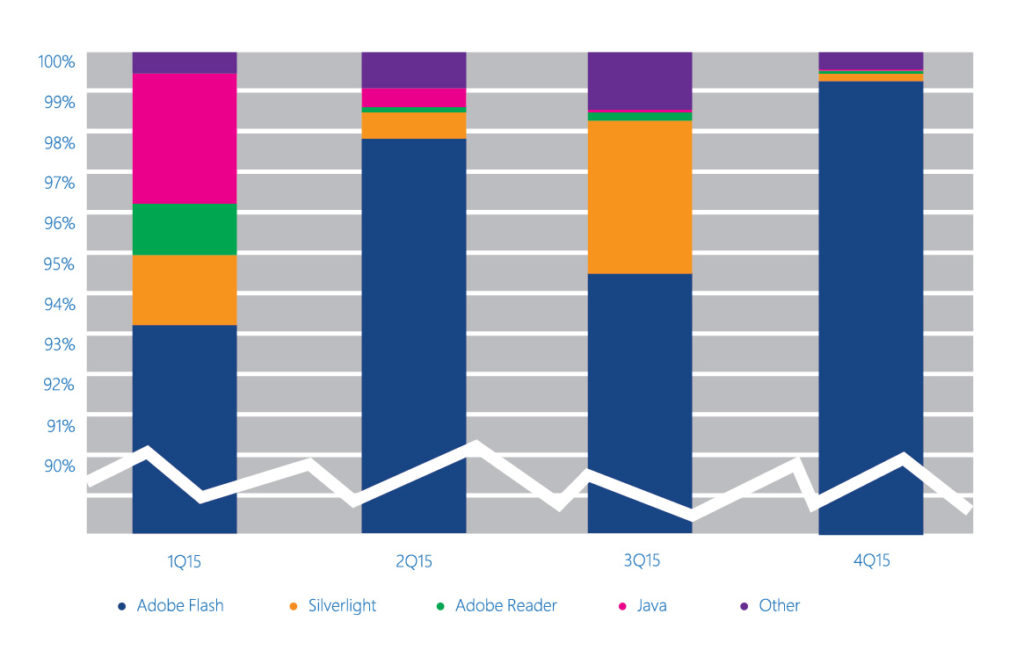
A chart showing the most commonly detected threat across Adobe Flah, Silverlight, Adobe Reader, Java and others.

While this information may be unsettling for security teams whose web sites and applications rely on Flash functionality, it’s clearly an important piece of intelligence. Knowing where attackers are targeting their cyber threats makes it easier to plan mitigations to defend against malicious web pages. It also illustrates the importance of keeping your full technology stack – including Adobe Flash Player – updated. And fortunately, as with Java, modern browser mitigations are beginning to turn the tide against Flash exploits as well.

Both Internet Explorer 11 and Microsoft Edge on Windows 10 help mitigate many web-based attacks. For example, Internet Explorer 11 benefits from IExtension Validation, which can help defend against Adobe Flash malware.

Real-time security software can implement IExtension Validation to block ActiveX controls from loading malicious pages. When Internet Explorer loads a webpage that includes ActiveX controls, the browser calls the security software to scan the HTML and script content on the page before loading the controls themselves. If the security software determines that the page is malicious (for example, if it identifies the page as an exploit kit landing page), it can direct Internet Explorer to prevent individual controls or the entire page from loading.

For a thorough analysis on the state of malware in the latter half of 2015, take a look at our latest Security Intelligence Report. And for a high-level look at the top ten trends and stats that matter most to security professionals right now, be sure and download our 2016 Trends in Cybersecurity e-book.


Related posts