

Today’s attacks put emphasis on leaving little, if any, forensic evidence to maintain stealth and achieve persistence. Attackers use methods that allow exploits to stay resident within an exploited process or migrate to a long-lived process without ever creating or relying on a file on disk. In recent blogs we described how attackers use basic cross-process migration or advanced techniques like atom bombing and process hollowing to avoid detection.
Reflective Dynamic-Link Library (DLL) loading, which can load a DLL into a process memory without using the Windows loader, is another method used by attackers.
In-memory DLL loading was first described in 2004 by Skape and JT, who illustrated how one can patch the Windows loader to load DLLs from memory instead of from disk. In 2008, Stephen Fewer of Harmony Security introduced the reflective DLL loading process that loads a DLL into a process without being registered with the process. Modern attacks now use this technique to avoid detection.
Reflective DLL loading isn’t trivial—it requires writing the DLL into memory and then resolving its imports and/or relocating it. To reflectively load DLLs, one needs to author one’s own custom loader.
However, attackers are still motivated to not use the Windows loader, as most legitimate applications would, for two reasons:
- Unlike when using the Windows loader (which is invoked by calling the LoadLibrary function), reflectively loading a DLL doesn’t require the DLL to reside on disk. As such, an attacker can exploit a process, map the DLL into memory, and then reflectively load DLL without first saving on the disk.
- Because it’s not saved on the disk, a library that is loaded this way may not be readily visible without forensic analysis (e.g., inspecting whether executable memory has content resembling executable code).
Instrumentation and detection
A crucial aspect of reflectively loading a DLL is to have executable memory available for the DLL code. This can be accomplished by taking existing memory and changing its protection flags or by allocating new executable memory. Memory procured for DLL code is the primary signal we use to identify reflective DLL loading.
In Windows 10 Creators Update, we instrumented function calls related to procuring executable memory, namely VirtualAlloc and VirtualProtect, which generate signals for Windows Defender Advanced Threat Protection (Windows Defender ATP). Based on this instrumentation, we’ve built a model that detects reflective DLL loading in a broad range of high-risk processes, for example, browsers and productivity software.
The model takes a two-pronged approach:
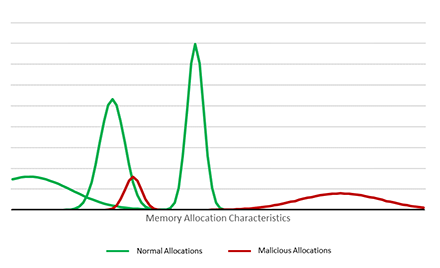
- First, the model learns about the normal allocations of a process. As a simplified example, we observe that a process like Winword.exe allocates page-aligned executable memory of size 4,000 and particular execution characteristics. Only a select few threads within the Winword process allocate memory in this way.
- Second, we find that a process associated with malicious activity (e.g., executing a malicious macro or exploit) allocates executable memory that deviates from the normal behavior.
This model shows that we can use memory events as the primary signal for detecting reflective DLL loading. In our real model, we incorporate a broad set of other features, such as allocation size, allocation history, thread information, allocation flags, etc. We also consider the fact that application behavior varies greatly because of other factors like plugins, so we add other behavioral signals like network connection behavior to increase the effectiveness of our detection.
Detecting reflective DLL Loading
Let’s show how Windows Defender ATP can detect reflective DLL loading used with a common technique in modern threats: social engineering. In this attack, the target victim opens a Microsoft Word document from a file share. The victim is tricked into running a macro code.
When the macro code runs, the Microsoft Word process reaches out to the command-and-control (C&C) server specified by the attacker, and receives the content of the DLL to be reflectively loaded. Once the DLL is reflectively loaded, it connects to the C&C and provides command line access to the victim machine.
Note that the DLL is not part of the original document and does not ever touch the disk. Other than the initial document with the small macro snippet, the rest of the attack happens in memory. Memory forensics reveals that there are several larger RWX sections mapped into the Microsoft Word process without a corresponding DLL. These are the memory sections where the reflectively loaded DLL resides.
Windows Defender ATP identifies the memory allocations as abnormal and raises an alert. Windows Defender ATP provides context on the document, along with information on command-and-control communication, which can allow security operations personnel to assess the scope of the attack and start containing the breach.
Microsoft Office 365 Advanced Threat Protection protects customers against similar attacks dynamic behavior matching. In attacks like this, SecOps personnel would see an Office 365 ATP behavioral detection on Office 365’s Threat Explorer page.
Conclusion: Windows Defender ATP uncovers in-memory attacks
Windows 10 continues to strengthen defense capabilities against the full range of modern attacks. In this blog post, we illustrated how Windows Defender ATP detects the reflective DLL loading technique. Security operations personnel can use the alerts in Windows Defender ATP to quickly identify and respond to attacks in corporate networks.
Windows Defender Advanced ATP is a post-breach solution that alerts SecOps personnel about hostile activity. Windows Defender ATP uses rich security data, advanced behavioral analytics, and machine learning to detect the invariant techniques used in attacks. Enhanced instrumentation and detection capabilities in Windows Defender ATP can better expose covert attacks.
Windows Defender ATP also provides detailed event timelines and other contextual information that SecOps teams can use to understand attacks and quickly respond. The improved functionality in Windows Defender ATP enables them to isolate the victim machine and protect the rest of the network.
For more information about Windows Defender ATP, check out its features and capabilities.
To test how Windows Defender ATP can help your organization detect, investigate, and respond to advanced attacks, sign up for a free trial.
Christian Seifert
Windows Defender ATP Research
Talk to us
Questions, concerns, or insights on this story? Join discussions at the Microsoft community and Windows Defender Security Intelligence.
Follow us on Twitter @WDSecurity and Facebook Windows Defender Security Intelligence.