


This blog is part of a series of posts providing a behind-the-scenes look of Microsoft’s Detection and Response Team (DART). While responding to cybersecurity incidents around the world, DART engages with customers who are wary about using Password Hash Sync (PHS) or are not utilizing this service’s full capabilities. As customers can gain tremendous security benefits using the full capabilities of this service, we want to demystify PHS.
What PHS is and is not
What is PHS? First, let’s start with what it is not. PHS doesn’t sync actual passwords. Rather, it syncs the hashes of passwords, which have all undergone a per-user salt and 1,000 iterations of the HMAC-SHA256 key hashing algorithm, before being sent to Azure Active Directory (Azure AD). Through our hands-on experiences, we’ve learned that many companies believe that Microsoft may have access to users’ passwords. Microsoft is committed to protecting your privacy, and it’s important to note that the SHA256 hash cannot be decrypted—so the plain-text version of the password is never and can never be exposed to Microsoft.
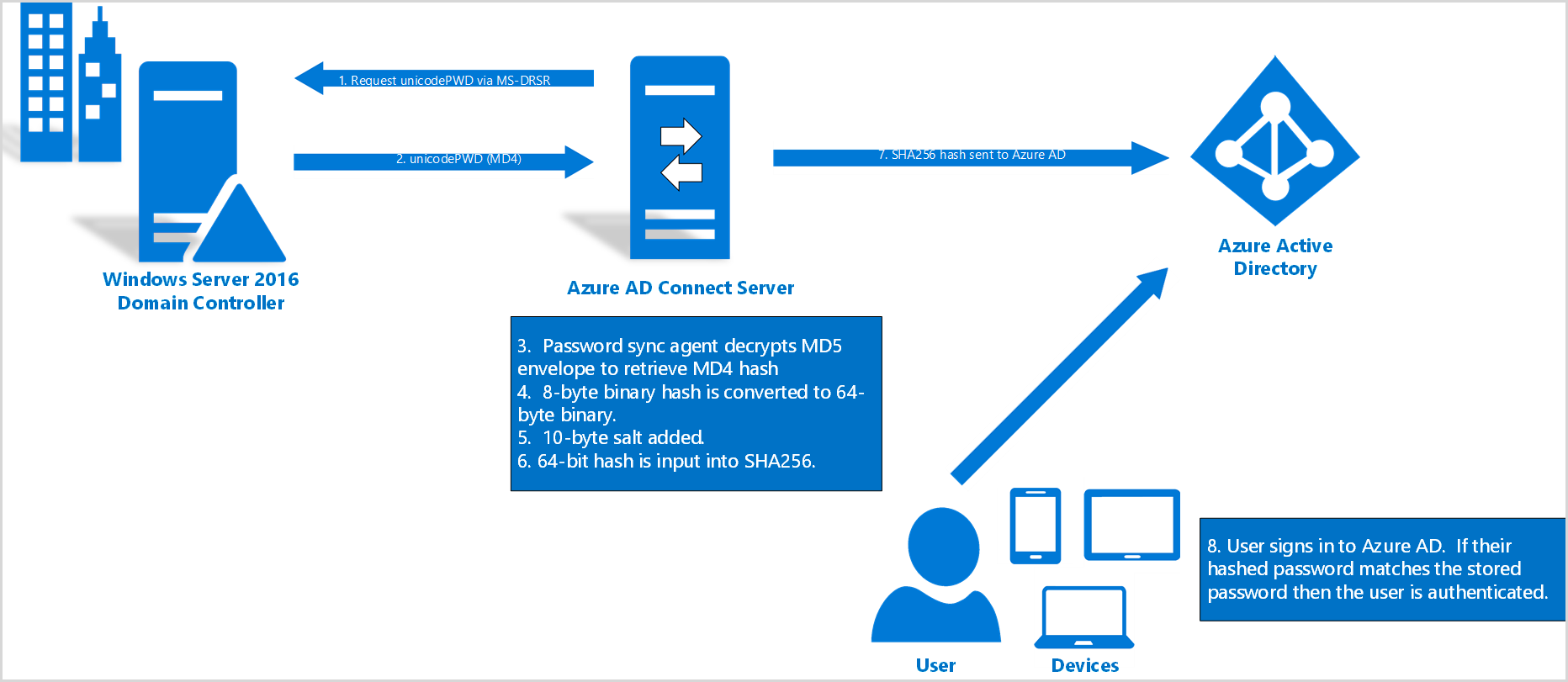
The second important consideration of PHS is that, with PHS your Identity Management provider is moved from your current provider to Azure AD. This allows the organization to move from an Identity Management provider—which is typically an on-premises server and requires maintenance and potentially server downtime—to a platform-as-a-service (PaaS) provider.
From a security perspective, organizations gain significant reliability advantages and improved capabilities by moving to PHS, including Smart Lockout, IP Lockout, and the ability to discover leaked credentials, as well as the benefits of utilizing Microsoft’s billions of worldwide data points as additional layers of security to your organization’s environment.
More about these key features:
- Smart Lockout assists in blocking bad actors who are attempting to brute force passwords. By default, Smart Lockout locks the account from sign-in attempts for one minute after ten failed attempts. Smart Lockout tracks the last three bad password hashes to avoid re-incrementing the lockout counter. For more information Smart Lockout, see Azure AD Smart Lockout.
- IP Lockout works by analyzing those billions of sign-ins to assess the quality of traffic from each IP address hitting Microsoft’s systems. With that analysis, IP Lockout finds IP addresses acting maliciously, such as an IP that is password spraying the tenant, and blocks those sign-ins in real-time, while allowing the real user to continue to successfully sign in.
- Microsoft Leaked Credentials Service acquires username/password pairs by monitoring public web sites and the Dark Web and by working with:
- Researchers
- Law enforcement
- Microsoft Security teams
- Other trusted sources
When the service acquires username/password pairs, the passwords are sent through the same hashing algorithm and are checked against Azure AD users’ password hashes. When a match is found (indicating a compromised credential), a “Leaked Credentials Risk Event” is created. Please see Azure AD Risk Events for additional information regarding Leaked Credentials.
Another important benefit to PHS is that, should your tenant experience a Denial of Service (DoS) and/or Password Spray attack, Microsoft will take the brunt of that traffic. That traffic is directed at Microsoft, not your on-premises Active Directory Federated Services (AD FS). When authentication happens via on-premises AD FS your server is responsible for managing the load and potentially causing downtime.
Moving an organization’s identity management provider to Azure AD and utilizing Password Hash Sync allows for both an increase in overall security posture and reduced management overhead. The security benefits, including leaked credentials, IP lockout, and Smart Lockout, all utilize Microsoft’s telemetry that gives organizations the power of Microsoft’s intelligence.
NOTE: If PHS is the secondary authentication method and, if you choose to take advantage of Smart Lockout and IP Lockout, the primary authentication method must support these functionalities. PHS is recommended as secondary in a hybrid environment if Federated or Pass-through Authentication is primary as a redundancy mechanism, as well as the ability to collect information for Leaked Credentials.
Learn more
To learn more about DART, our engagements, and how they are delivered by experienced cybersecurity professionals who devote 100 percent of their time to providing cybersecurity solutions to customers worldwide, please contact your account executive. Also, bookmark the Security blog to keep up with our expert coverage on security matters and follow us at @MSFTSecurity for the latest news and updates on cybersecurity. Read DART: the Microsoft cybersecurity team we hope you never meet for more about the DART team.