

Detect, assess, and remediate phishing risks across your organization
A successful phishing attack requires just one person to take the bait. That’s why so many organizations fall victim to these cyber threats. To reduce this human risk, you need a combination of smart technology and people-centric security awareness training. But if you don’t understand your vulnerabilities, it can be difficult to know where to start. Attack simulation training capabilities in Office 365 Advanced Threat Protection (Office 365 ATP) empower you to detect, assess, and remediate phishing risk through an integrated phish simulation and training experience. And, in October 2020, you can get true phishing clickthrough benchmarks when you register for the Terranova Security Gone Phishing TournamentTM.
Terranova Security is a global leader in cybersecurity awareness training that draws on principles of behavioral science to create training content that changes user behavior. Through a partnership with Microsoft, Terranova Security is able to enrich our training programs with insights from the Microsoft platform, while Microsoft leverages our content and technology in Microsoft Office 365 Advanced Threat Protection (Office 365 ATP).
Today’s blog shares how the Gone Phishing Tournament helps you baseline against your industry and peers, and how Office 365 ATP Attack Simulation training can help you mitigate the risk of a phishing-related data breach.
How does your risk of being phished stack up?
Cybercriminals exploit human psychology to trick users, which is why they introduced COVID-19-themed phishing lures in the early days of the pandemic. Many employees are working from home for the first time and have children and other family members competing for their attention. Bad actors hope to trick employees when they are busy and stressed. Although it’s understandable why people accidentally act on phishing campaigns, there is an opportunity to turn your employees into your first line of defense. When people understand how phishing campaigns work, your organization is more secure.
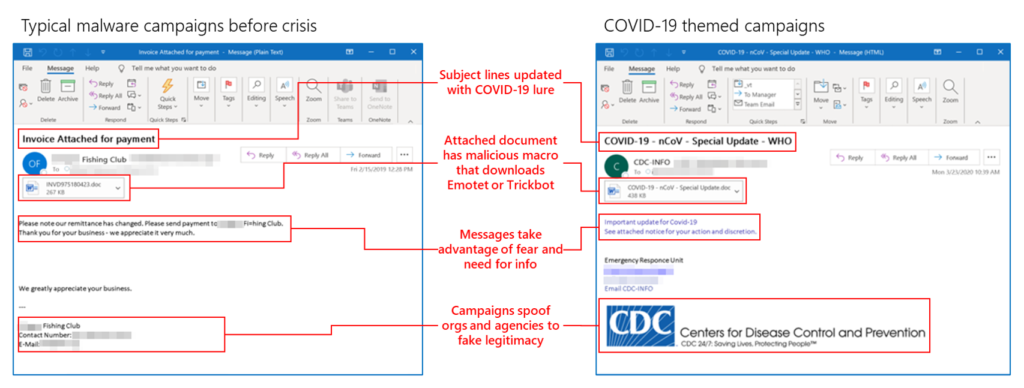
The Gone Phishing Tournament will give you valuable insight into how well employees understand phishing. The Gone Phishing Tournament is a free, annual cybersecurity event that takes place in October. The tournament leverages a phishing email based on real-world threats provided by Attack simulation training in Office 365 ATP and localizes it for your audience. After you register, you can select the users you want to include in the phishing simulation. We run the simulation for a set number of days using the same template, so you get an accurate assessment of how you compare to peer organizations. At the end of the tournament, you’ll receive a personalized click report and a global benchmarking report.
Empower employees to defend against phishing threats
Phishing simulations are a great way to educate employees about phishing threats, but to shift behavior you need a regular program that includes targeted education alongside simulations. Terranova Security’s awareness training, which will soon be available in Office 365 ATP, takes a pedagogical approach with gamification and interactive sessions designed to engage adults. It is localized for employees around the world and complies with web content accessibility guidelines (WCAG) 2.0.
Later this year, Office 365 ATP Attack Simulator and Training will launch integrated with Terranova Security awareness training. You’ll be able to take advantage of comprehensive training benefits that will help you measure behavior change and automate design and deployment of an integrated security awareness training program:
- Simulate real threats: Detect vulnerabilities with real lures and templates for accurate risk assessment. By automatically or manually sending employees the same emails that attackers have used against your organization, you can uncover risk. Then, target users who fall for phish with personalized training content that helps them connect what they learned with real-world campaigns.
- Remediate intelligently: Quantify social engineering risk across your employees and threat vectors to prioritize remedial training. Track your organization’s progress against a baseline and measure the behavioral impact of training. Using user susceptibility metrics, you can trigger automated repeat offender simulations and training for people who need extra attention.
- Improve security posture: Reinforce your human firewall with hyper-targeted training designed to change employee behavior. Training can be customized and localized to meet the diverse needs of employees. Tailor simulations to your employee’s contexts—region, industry, function—with granular conditionality on harvesting. You can also cater to diverse learning styles and reinforce awareness with interactive nano learning and microlearning content.
In the new world of remote work, it has become clear that your people are your perimeter. Attack simulation training in Office 365 ATP, delivered in partnership with Terranova Security can help you identify vulnerable users and deliver targeted, engaging education that empowers them to defend against the latest phishing threats. Look for a future blog from me in the beginning of cybersecurity awareness month that will discuss in more detail how to train your employees on security. In the meantime, register for Terranova Security Gone Phishing Tournament October 2020.
To learn more about Microsoft Security solutions visit our website. Bookmark the Security blog to keep up with our expert coverage on security matters. Also, follow us at @MSFTSecurity for the latest news and updates on cybersecurity.