


Change came quickly in 2020. More likely than not, a big chunk of your workforce has been forced into remote access. And with remote work came an explosion of bring-your-own-device (BYOD) scenarios, requiring your organization to extend the bounds of your network to include the entire internet (and the added security risks that come with it).
At this year’s Microsoft Ignite, we demonstrated how to bring your legacy on-premises resources into a Zero Trust security model that provides seamless access to all—SaaS, IaaS, PaaS, and on-premises—with a global presence and no extra steps to remember. You’re invited to watch our full presentation and review the highlights below.
The new decentralized workplace
Organizations that steadfastly relied on the “flat network” approach of firewalls and VPNs to regulate access now find themselves lacking the visibility, solution integration, and agility needed to deliver end-to-end security. A new model needed to adapt to a remote workforce, protecting people, devices, applications, and data—from anywhere.
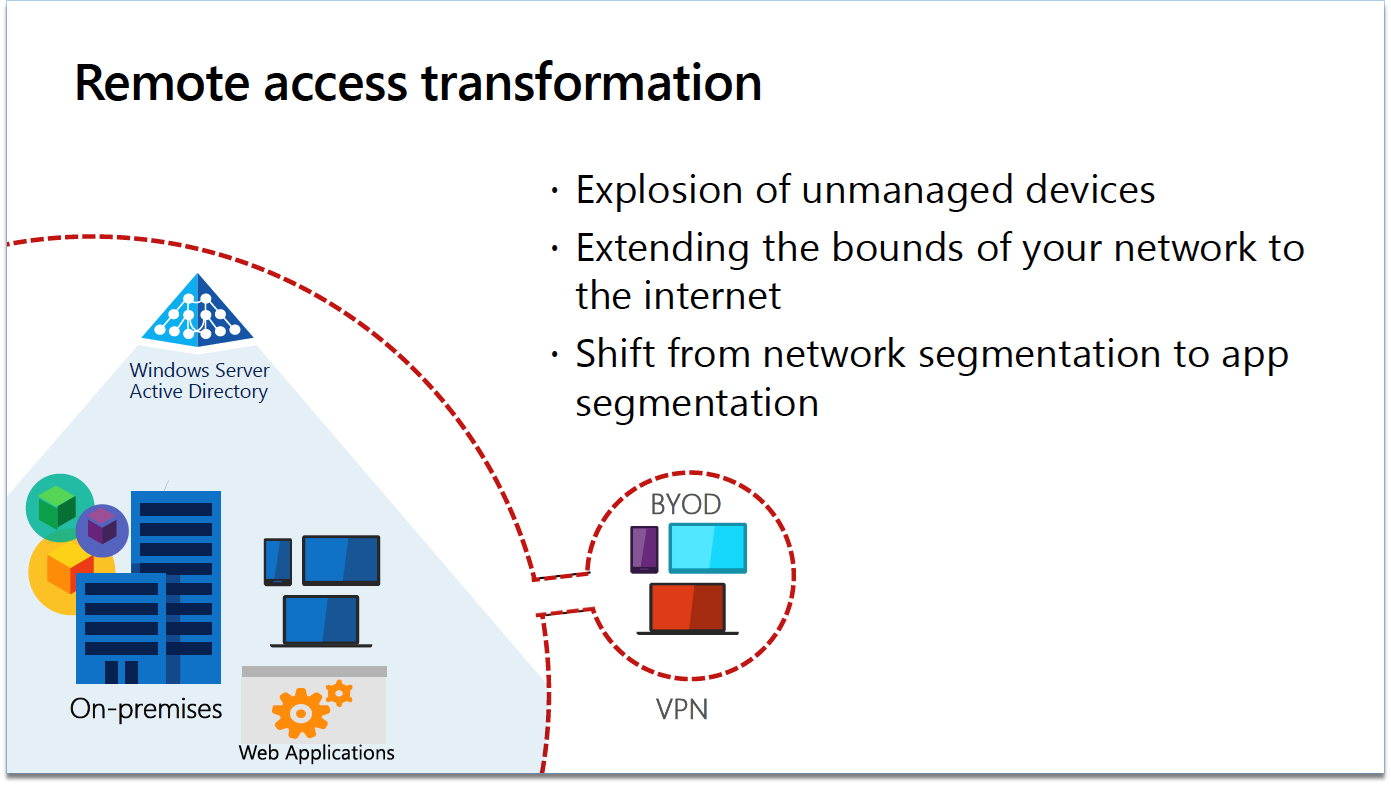
Figure 1: Legacy access model
In a Zero Trust security model, every access request is strongly inspected for anomalies before granting access. Everything from the user’s identity to the application’s hosting environment is authenticated and authorized using micro-segmentation and least privileged-access principles to minimize lateral movement.
Zero Trust means adhering to three cohesive principles:
- Verify explicitly: Always authenticate and authorize based on all available data points, including—user identity, location, device health, service or workload, data classification, and anomalies.
- Use least privileged access: Limit user access with just-in-time (JIT) and just-enough-access (JEA), risk-based adaptive polices, and data protection to help secure both data and productivity.
- Assume breach: Minimize the blast radius and prevent lateral movement by segmenting access by network, user, devices, and app awareness. Verify all sessions are encrypted and use analytics to gain visibility, drive threat detection, and improve defenses.
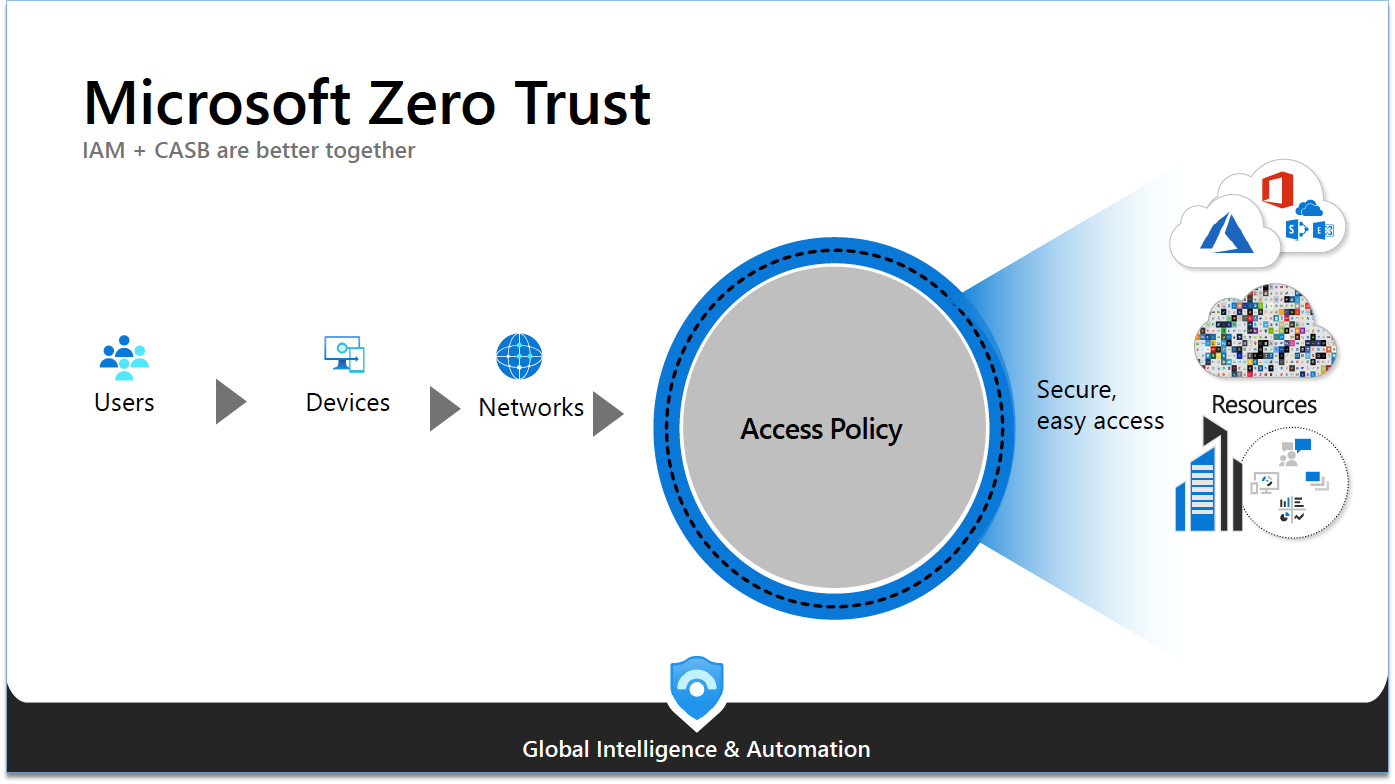
Figure 2: Microsoft Zero Trust model
In the diagram above, you can see how access is unified across users, devices, and networks; all the various conditions that feed into the risk of a session. Acting as a gateway, the access policy is unified across your resources—SaaS, IaaS, PaaS, on-premises, or in the cloud. This is true whether it’s Azure, Amazon Web services (AWS), Google Cloud Platform (GCP) or some other cloud. In the event of a breach, rich intelligence, and analytics help us identify what happened and how to prevent it from happening again.
Cybersecurity for our time
The right security solution for our new perimeterless workplace employs the principles of Zero Trust, allowing users access only to the specific applications they need rather than the entire network. Because Zero Trust access is tied to the user’s identity, it allows IT departments to quickly onboard new and remote users, often on non-corporate devices, scoping permissions appropriately.
A cybersecurity model for today’s digital estate should include:
For the end-user:
- Access to all resources: SaaS, IaaS, PaaS, on-premises.
- Seamless experience: No extra steps or unique URLs to remember.
- Great performance: Proxy services should have a global presence and use geo-location.
For the security/IT admin:
- Segmentation by app, not network.
- Adaptive access based on the principles of Zero Trust.
- Reduce infrastructure complexity and maintenance.
Connect apps to an identity based, secure access solution
With Microsoft Azure Active Directory (Azure AD), it’s easy to connect all your applications through a single identity-based control plane. When it comes to cloud apps, Azure AD supports standard authentication modes such as Security Assertion Markup Language (SAML) and OpenID Connect (OIDC). To accommodate new apps your organization may be developing, Azure AD also provides tools and software development kits (SDK) to help you integrate these as well.
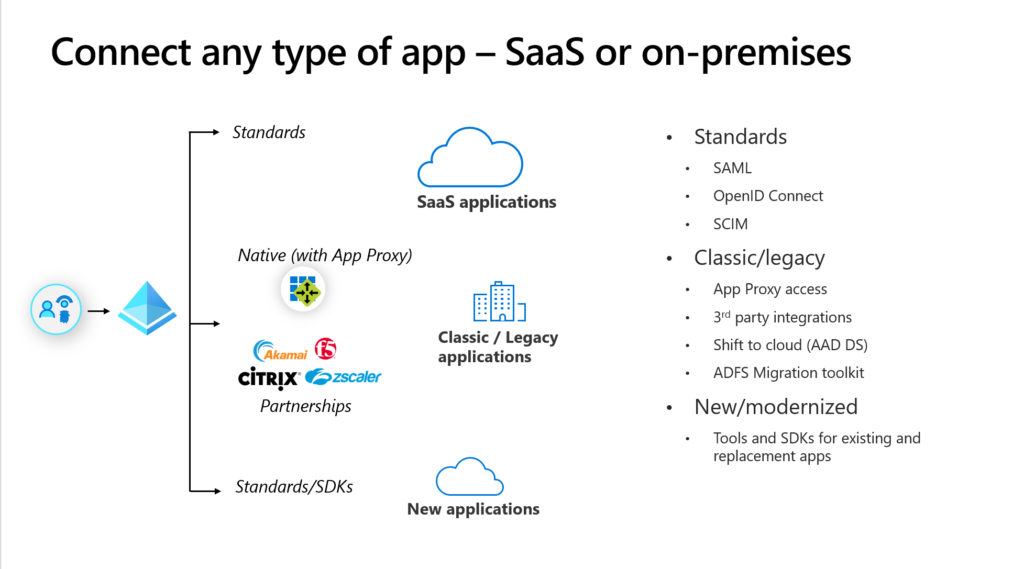
Figure 3: Microsoft Azure Active Directory
When it comes to classic or on-premises applications, Azure AD Application Proxy enables your security team to easily apply the same policies and security controls used for cloud apps to your on-premises apps. All that’s needed is to install a lightweight agent called a connector onto your Windows server, allowing a connection point to your on-premises network. In this way, one connector group can be configured to serve multiple back-end applications, giving you the freedom to architect a truly micro-segmented solution.
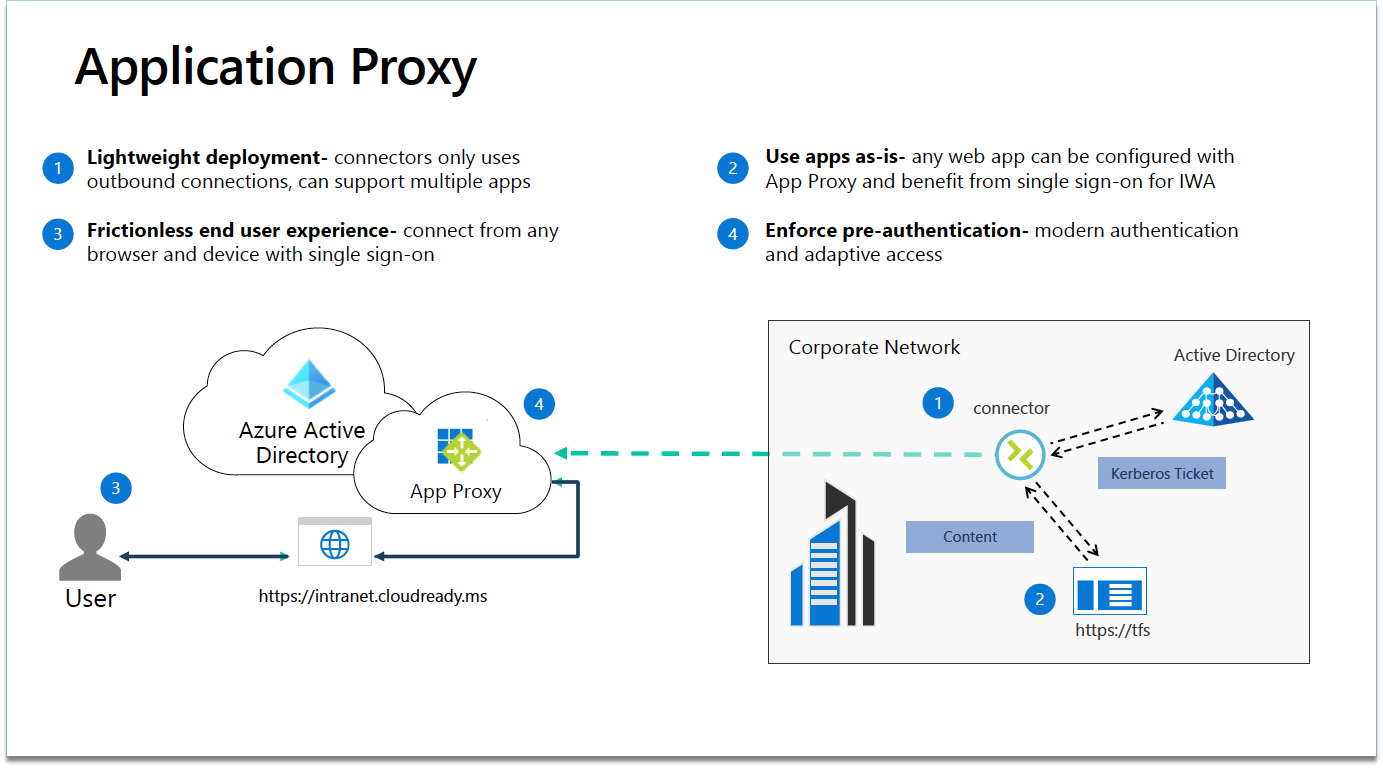
Figure 4: Azure Active Directory Application Proxy
Azure AD Application Proxy Connectors use outbound connections as well; meaning, no additional inbound firewall rules need to be opened. Also, it doesn’t require placement in a demilitarized zone (DMZ), as was the case with the legacy Purdue Model. Your apps won’t need to change, and Azure AD Application Proxy also supports multiple authentication modes; so your users can still get a single sign-on (SSO) experience. Users can then access the app from an external URL using any device—no VPN required.
Azure AD pre-authenticates every request, ensuring that only verified traffic ever gets to your app; thus giving you another layer of protection. In addition, any conditional access policies you’ve set up can be enforced at that point.
Protecting you in real-time
Microsoft Cloud App Security integrates natively with Azure AD conditional access to extend real-time security into the session for both your cloud and on-premises applications. This native Microsoft solution stack ensures that your on-premises applications will still boot up quickly and look the same. The difference is you’re now able to control granular actions, such as uploads, downloads, and cut, copy, and paste, based on the sensitivity of the data. For example, users accessing an on-premises instance of Team Foundation Server (TFS) through the App Proxy can use Cloud App Security to enable developers to make code changes but block their ability to download files onto an unmanaged device. Many other scenarios are supported like, blocking malware in file upload attempts to ensure that your on-premises infrastructure remains secure.
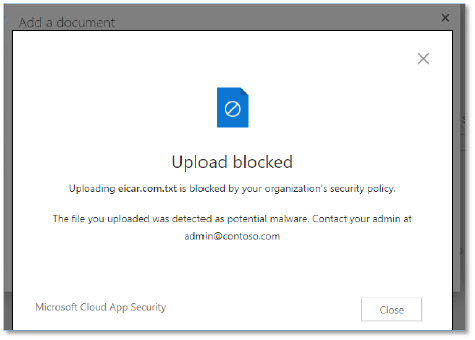
Figure 5: Malware detection screen
See what else Azure AD and Microsoft Cloud App Security can do
At Microsoft, we believe that tight integration between identity and security is pivotal to your Zero Trust strategy, and we are constantly innovating in this area. To see some of the existing capabilities described in this blog come to life, watch the archived presentation for demonstrations of the powerful capabilities that Microsoft identity and security tools enable for your on-premises applications. Learn how you can easily set controls to allow or block access, require a password reset, block legacy authorization, require multifactor authentication, control sessions in real-time, and more.
To learn more about Microsoft Security solutions visit our website. Bookmark the Security blog to keep up with our expert coverage on security matters. Also, follow us at @MSFTSecurity for the latest news and updates on cybersecurity.