


Security is a constant balance between proactive and reactive defenses. They are both equally important, and neither can be neglected. Effectively protecting your organization means constantly optimizing both prevention and detection.
That’s why we’re excited to announce a seamless integration between Azure Firewall and Azure Sentinel. Now, you can get both detection and prevention in the form of an easy-to-deploy Azure Firewall solution for Azure Sentinel.
Combining prevention and detection allows you to ensure that you both prevent sophisticated threats when you can, while also maintaining an “assume breach mentality” to detect and quickly respond to cyberattacks.
Azure Sentinel and Azure Firewall: Better together
The seamless integration of Azure Firewall and Azure Sentinel enables security operations with three key capabilities:
- Monitoring and visualizing Azure Firewall activities.
- Detecting threats and leveraging AI-assisted investigation capabilities.
- Automating response and correlation to other sources.
The whole experience is packaged as a solution in the Azure Sentinel marketplace, which means it can be deployed in just a few clicks.
How do you deploy and enable the Azure Firewall solution for Azure Sentinel?
Deploying the solution is simple. You can find it in the “Solutions” blade in your Azure Sentinel workspace, called the “Azure Firewall Solution for Azure Sentinel.”
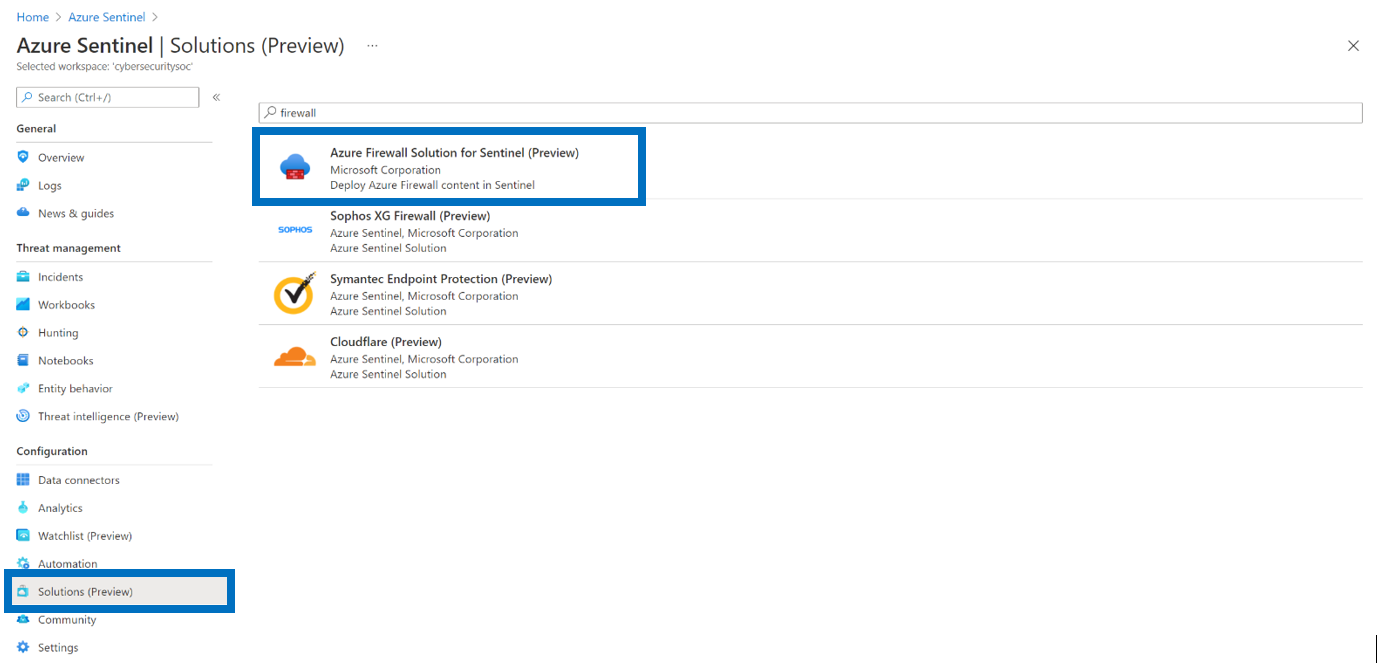
Figure 1: Azure Sentinel solutions preview.
Once you open the Azure Firewall solution, simply hit the “create” button, follow all the steps in the wizard, pass validation, and create the solution. With just a few clicks, all content—including connectors, detections, workbooks, and playbooks that we’ll cover below—will be deployed in your Azure Sentinel workspace.
Monitoring and visualizing Azure Firewall activities
The Azure Firewall workbook allows you to visualize Azure Firewall events. With this workbook, you can:
- Learn about your application and network rules.
- See statistics for firewall activities across URLs, ports, and addresses.
- Filter by firewall and resource group.
- Dynamically filter per category with easy-to-read data sets when investigating an issue in the logs.
The workbook provides a single dashboard for ongoing monitoring of your firewall activity. When it comes to threat detection, investigation, and response, the Azure Firewall solution also provides built-in detection and hunting capabilities.
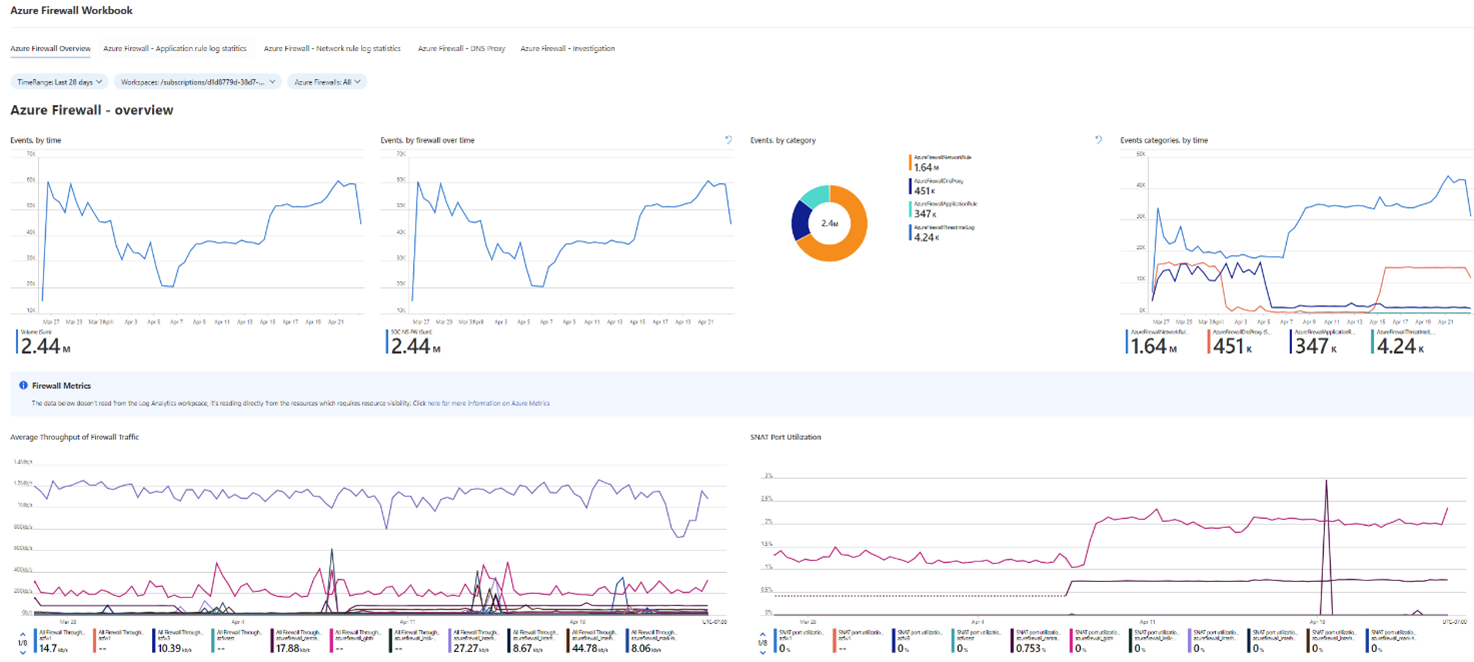
Figure 2. Azure Firewall workbook.
Detecting threats and leveraging AI-assisted investigation capabilities
Built-in Threat Detection—analytics
The solution’s detection rules provide Azure Sentinel a powerful method for analyzing Azure Firewall signals to detect traffic representing malicious activity patterns traversing through the network. This allows rapid response and remediation of the threats.
The attack stages an adversary will pursue within the firewall solution are segmented based on the MITRE ATT&CK framework. The MITRE framework is a series of steps that trace stages of a cyberattack from the early reconnaissance stages to the exfiltration of data. The framework helps defenders understand and combat ransomware, security breaches, and advanced attacks.
The solution includes detections for common scenarios an adversary might use as part of the attack—Spanning from the discovery stage (gaining knowledge about the system and internal network) through the command-and-control (C2) stage (communicating with compromised systems to control them) to the exfiltration stage (adversary trying to steal data from the organization).
| Detection rule | What does it do? | What does it indicate? |
| Port scan | Identifies a source IP scanning multiple open ports on the Azure Firewall. | Malicious scanning of ports by an attacker, trying to reveal open ports in the organization that can be compromised for initial access. |
| Port sweep | Identifies a source IP scanning the same open ports on the Azure Firewall different IPs. | Malicious scanning of a port by an attacker trying to reveal IPs with specific vulnerable ports open in the organization. |
| Abnormal deny rate for source IP | Identifies an abnormal deny rate for a specific source IP to a destination IP based on machine learning done during a configured period. | Potential exfiltration, initial access, or C2, where an attacker tries to exploit the same vulnerability on machines in the organization but is being blocked by the Azure Firewall rules. |
| Abnormal Port to protocol | Identifies communication for a well-known protocol over a non-standard port based on machine learning done during an activity period. | Malicious communication (C2) or exfiltration by attackers trying to communicate over known ports (SSH, HTTP) but don’t use the known protocol headers that match the port number. |
| Multiple sources affected by the same TI destination | Identifies multiple machines that are trying to reach out to the same destination blocked by threat intelligence (TI) in the Azure Firewall. | An attack on the organization by the same attack group trying to exfiltrate data from the organization. |
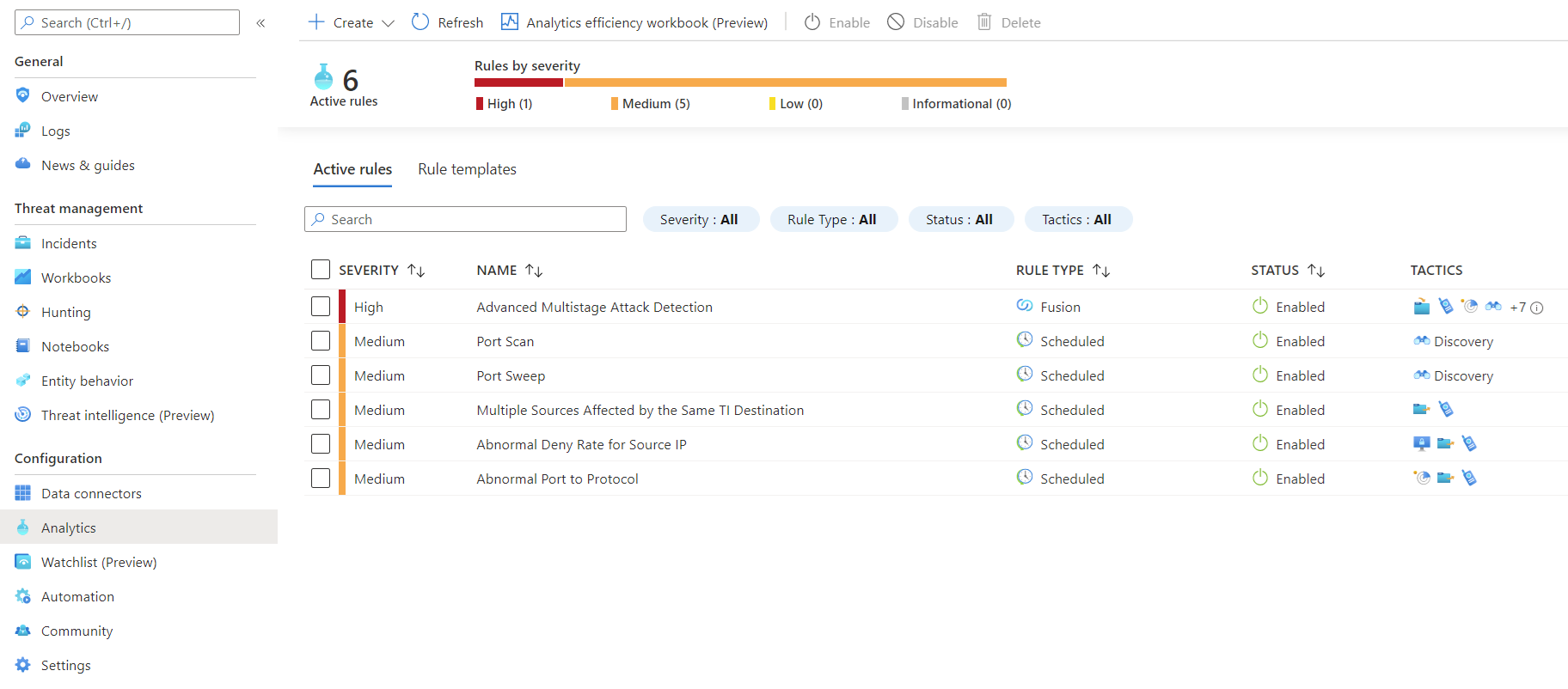
Figure 3. Azure Firewall threat detections in Sentinel.
Hunting queries
Hunting queries are a tool for the security researcher to look for threats in the network of an organization, either after an incident has occurred or proactively to discover new or unknown attacks. To do this, security researchers will look at several indicators of compromise (IOCs). The built-in Azure Sentinel hunting queries in the Azure Firewall solution give security researchers the tools they need to find high-impact activities from the firewall logs. Several examples include:
| Hunting query | What does it do? | What is it based on? What does it indicate? |
| First time a source IP connects to destination port | Helps to identify a common indication of an attack (IOA) when a new host or IP tries to communicate with a destination using a specific port. | Based on learning the regular traffic during a specified period. |
| First time source IP connects to a destination | Helps to identify an IOA when malicious communication is done for the first time from machines that never accessed the destination before. | Based on learning the regular traffic during a specified period. |
| Source IP abnormally connects to multiple destinations | Identifies a source IP that abnormally connects to multiple destinations. | Indicates initial access attempts by attackers trying to jump between different machines in the organization, exploiting lateral movement path or the same vulnerability on different machines to find vulnerable machines to access. |
| Uncommon port for the organization | Identifies abnormal ports used in the organization network. | An attacker can bypass monitored ports and send data through uncommon ports. This allows the attackers to evade detection from routine detection systems. |
| Uncommon port connection to destination IP | Identifies abnormal ports used by machines to connect to a destination IP. | An attacker can bypass monitored ports and send data through uncommon ports. This can also indicate an exfiltration attack from machines in the organization by using a port that has never been used on the machine for communication. |
Automating response and correlation to other sources
Lastly, the Azure Firewall also includes Azure Sentinel playbooks, which enable you to automate response to threats. For example, if the firewall logs an event where a particular device on the network is trying to communicate with the internet via HTTP protocol over a non-standard TCP port, this action will trigger a detection in Azure Sentinel. The playbook will automate a notification to the security operations team via Microsoft Teams, and the security analysts can block the source IP of the device with a single click—preventing it from accessing the internet until an investigation can be completed. Playbooks allow this process to be much more efficient and streamlined.
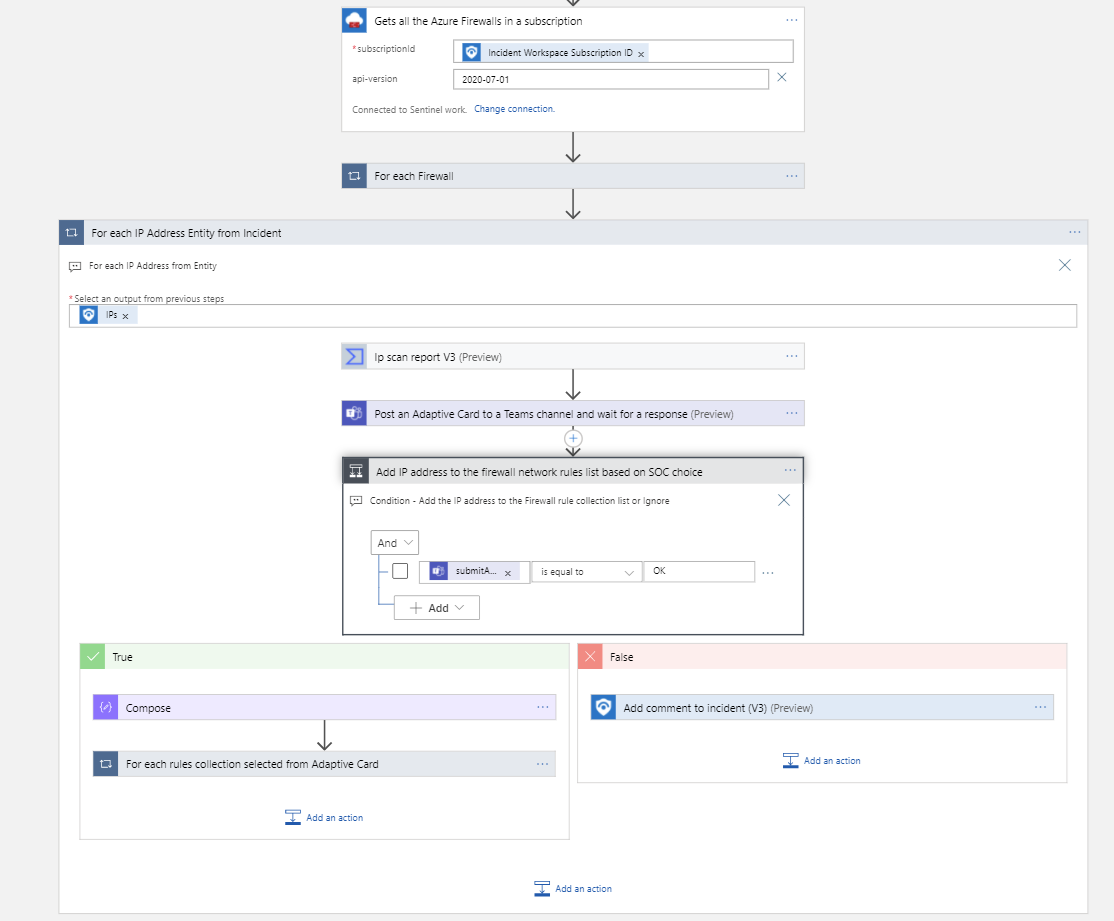
Figure 4. Playbook automation configuration.
Seeing the integrated solution in action: Seamless hunting with pre-configured Azure Firewall hunting queries
Let’s look at what the fully integrated solution looks like in a real-world scenario.
The attack and initial prevention by Azure Firewall
A sales representative in the company has accidentally opened a phishing email and opened a PDF file containing malware. The malware immediately tried to connect to a malicious website but was blocked by the Azure Firewall, which detected the domain due to the Microsoft threat intelligence feed it consumes.
The security analyst response based on the Azure Firewall solution for Azure Sentinel
The connection attempt triggered a detection in Azure Sentinel and started the playbook automation process to notify the security operations team via a Teams channel, where, with a click of a button, the analyst was able to block the computer from communicating with the internet. The security operations team then notified the IT department which removed the malware from the sales representative’s computer. However, taking the proactive approach and looking deeper, the security researcher leveraged the Azure Firewall hunting queries and ran the “Source IP abnormally connects to multiple destinations” query. This reveals that the malware on the infected computer tried to communicate with several other devices on the broader network and tried to access several of them. One of those access attempts succeeded, as there was no proper network segmentation to prevent the lateral movement in the network, and the new device had a known vulnerability the malware exploited to infect it.
The result
The security researcher removed the malware from that new device, completed mitigating the attack, and discovered a network weakness in the process.
Conclusion
Integrating threat prevention and threat detection is key to properly securing your organization and enabling your security operations team to monitor and respond to threats.
Enabling the Azure Firewall solution on your Azure Sentinel workspace is just a few clicks away. Start now.
Learn more
In addition to the Azure Firewall solution, we announced several new Azure Sentinel innovations at the RSA Conference 2021. Learn more about these announcements, including new integrations, machine learning features, collaboration capabilities, and more on the Azure Sentinel announcement blog.
To learn more about Microsoft Security solutions, visit our website. Bookmark the Security blog to keep up with our expert coverage on security matters. Also, follow us at @MSFTSecurity for the latest news and updates on cybersecurity.