Dataverse Admin Skills (dv-admin) lets Power Platform admins use natural language to manage Dataverse environments at scale. No more clicking through Power Platform admin center (PPAC), no more repetitive tasks across 50 environments.
The Problem with Agentic Administration Today
You’re managing 20 Dataverse environments. A security team asks you to enforce settings everywhere. You open the Power Platform admin center, click through the environment list, enter settings for each one, repeat 20 times. Or you wait for a script engineer to define a bulk delete flow for stale records. Hours of work that a computer should have done in seconds.
That gap between intent and execution is where agentic administration lives. And it’s now available.
What is Dataverse Admin Skills?
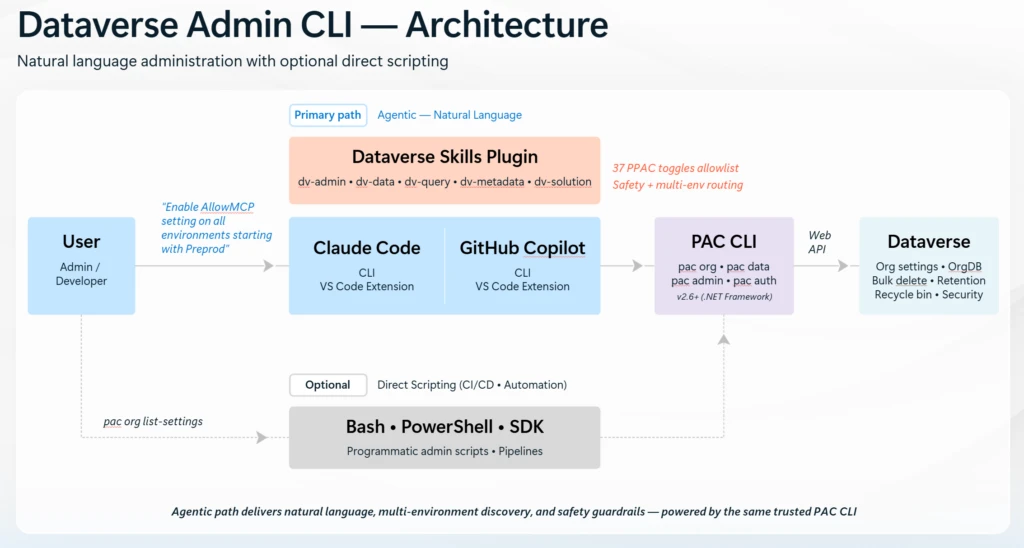
Dataverse Admin Skills brings Dataverse environment administration into your coding tool through two paths:
- Primary path: Agentic (natural language). You describe what you want in plain English. The Dataverse Skills Plugin (which includes dv-admin, dv-data, dv-query, dv-metadata, dv-solution, and more) runs inside Claude Code or GitHub Copilot. It translates your intent into the right PAC CLI commands (pac org, pac data, pac admin, pac auth), executes them against the Dataverse Web API, and handles everything from org settings and OrgDB toggles to bulk delete, retention, recycle bin, and security. The plugin enforces a 37-toggle Power Platform admin center (PPAC) allowlist and built-in safety guardrails, including confirmation prompts and multi-environment parallel execution.
- Optional path: Direct scripting. The same PAC CLI commands that power the agentic path are available for Bash, PowerShell, or SDK scripts. Use this for CI/CD pipelines, runbooks, or any automation where you want repeatable, programmatic control.
Both paths hit the same trusted PAC CLI (v2.6+, .NET Framework) and Dataverse Web API. The agentic path adds natural language understanding, multi-environment discovery, and safety checks on top.
Try this Prompt: “Enable AllowMCP setting on all environments starting with Preprod”
The agent responds:
- Lists your Dataverse environments
- Filters for environments starting with “Preprod”
- Asks you to confirm the list
- Updates each environment in parallel
- Shows you a summary table of what changed
One sentence. No browser tabs. No scripts to write.
What’s Available Now and Coming Soon
- Settings Management. Read and update 37 allowlisted Power Platform admin center (PPAC) toggles across environments: MCP, audit, retention, recycle bin, search, Fabric, security, and more. Single environment or bulk, with parallel execution.
- Bulk Delete. Schedule, list, pause, resume, and cancel bulk delete jobs. Built-in safety: confirmation prompts before destructive operations, FetchXML validation, and system table warnings.
- Long-Term Retention. Enable retention on entities, define archival criteria with FetchXML, and monitor retention jobs. Move old records to long-term storage without permanently deleting them, ideal for compliance scenarios.
- Capacity Management (coming soon): storage breakdowns, growth trends, capacity alerts, and archival recommendations, all from your coding tool. We’ll share these scenarios as they become available.
Get Started and Try it out in three simple steps
Step 1: Install the plugin
GitHub Copilot (VS Code):
/plugin install dataverse@awesome-copilot
Claude Code:
/plugin install dataverse@claude-plugins-official
Step 2: Try it
- Open your coding tool and ask:
- List all my Dataverse environments
- The agent will install PAC CLI if needed, authenticate you, and return your environments. If anything is missing, it walks you through it.
Step 3: Test the scenarios
Settings management:
- “Is auditing enabled on my dev environment?”
- “Enable auditing on all my developer environments”
- “Show me plugin trace log settings across all my environments”
Bulk delete:
- “Delete all email records created before January 1, 2024”
- “Show me all bulk delete jobs on my environment”
- “Pause the bulk delete job with ID …”
This is the initial public preview release. We are continuously refining and expanding skills, so keep checking for updates. Learn more:
- Dataverse Plugin in Claude Marketplace Blog: Dataverse Plugin Is Now on the Claude Marketplace | Power Platform Developer Blog
- Dataverse Skills Blog: Dataverse Skills: Your Coding Agent Now Speaks Dataverse | Power Platform Developer Blog
- Dataverse Skills GitHub: Eight Dataverse Skills available today